Tell us what you are building, connecting, improving, or exploring. We’ll follow up with a practical next step.
Your information is used to respond to this inquiry.
BigCommerce Custom Advanced B2B Buyer Permissions
BigCommerce Custom Advanced B2B Buyer Permissions
Introducing Advanced B2B Buyer Permissions for BigCommerce
B2B ecommerce is rarely one-size-fits-all.
A single company account may include buyers, approvers, accounting users, sales representatives, and company administrators. Each user may need access to the same buyer portal, but they should not always see the same information, perform the same actions, or manage the same account functions.
As BigCommerce B2B stores grow across companies, locations, departments, and approval workflows, basic role management can become difficult to scale. Merchants need a clearer way to define who can view, create, approve, manage, and administer key parts of the buying experience.
That is why Collin Commerce built the Advanced B2B Buyer Permissions App for BigCommerce.
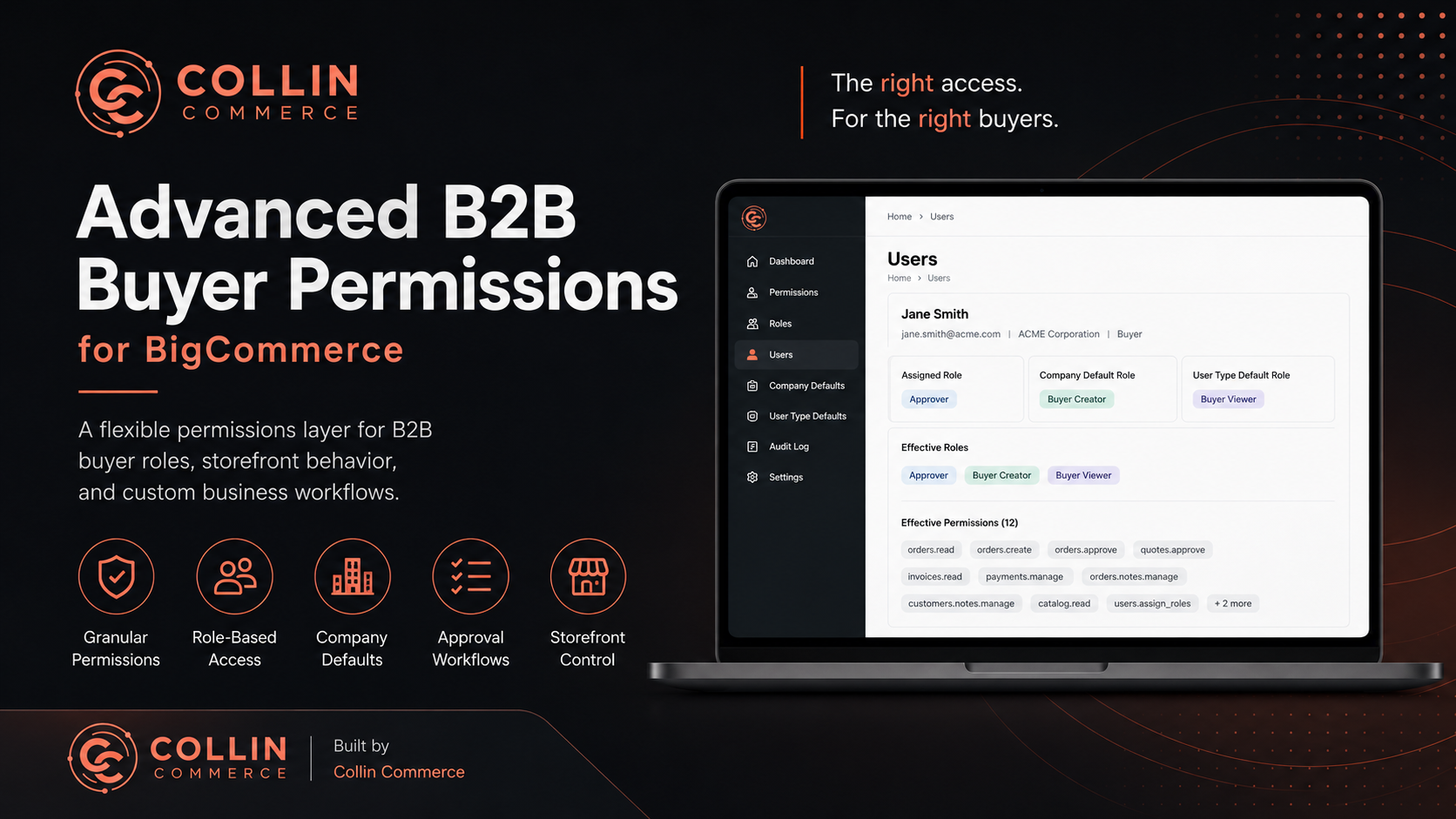
The app is designed to complement BigCommerce B2B Edition by adding a flexible permissions layer for buyer roles, storefront behavior, and custom business workflows. It gives Collin Commerce customers a practical way to manage buyer permissions, roles, and storefront access rules from a dedicated admin interface built around real B2B operations.
Why Buyer Permissions Matter in B2B Ecommerce
In B2C ecommerce, most customers follow a similar path: browse, add to cart, and checkout.
B2B buying is different.
A single company account may include multiple users with different responsibilities, such as:
Buyers who can place orders
Approvers who review quotes or purchases
Accounts payable managers who need invoice and payment access
Sales representatives who need customer-specific visibility
Company administrators who manage users and permissions
Without clear permissions, merchants can run into operational challenges, including:
Buyers seeing actions they should not use
Internal notes or customer data exposed to the wrong users
Manual workarounds for approval workflows
Confusion around who can approve, edit, or manage account activity
Storefront experiences that are too broad for complex B2B teams
The Advanced B2B Buyer Permissions App helps solve these challenges by giving merchants a structured permissions layer that can support both admin operations and buyer-facing storefront logic.
What the App Does
The app provides a merchant-facing admin tool for managing custom B2B access rules inside a BigCommerce environment.
At a high level, merchants can:
Create and manage permissions
Build roles from permission sets
Assign roles to users
Assign default roles by company
Assign default roles by company user type
View each buyer’s effective permissions
Support storefront permission checks for buyer-facing features
The goal is simple: give B2B merchants a scalable way to control who can do what across the buyer portal.
Permissions: Define What Users Can Do
Permissions are the building blocks of the app.
A permission represents an action, capability, or access rule. Some permissions may map to standard B2B concepts, while others may represent custom business rules enforced by the storefront or app logic.
Examples of permissions may include:
catalog.read
orders.read
orders.create
orders.approve
quotes.approve
invoices.read
payments.manage
orders.notes.manage
customers.notes.manage
users.assign_roles
This gives merchants the flexibility to model both standard B2B workflows and custom operational needs.
Roles: Bundle Permissions into Reusable Access Profiles
Instead of assigning permissions one by one to every buyer, the app allows merchants to create roles.
A role is a reusable access profile made up of multiple permissions. This makes user management cleaner, easier to scale, and easier to maintain over time.
Example roles might include:
Buyer Viewer
Buyer Creator
Approver
AP Manager
Sales Representative
Company Administrator
Each role can be tailored to the merchant’s workflow. For example, an approver might receive quote and order approval permissions, while an AP manager might receive invoice and payment-related permissions.
User Assignments: Control Access at the Buyer Level
The Users screen lets merchants assign roles directly to individual buyers.
This is useful when a specific buyer needs a custom level of access that differs from the company default.
For each user, the app can show:
Email
Company
Assigned role
User type, when available
Effective roles
Effective permissions
This makes troubleshooting much easier. Instead of guessing why a buyer can or cannot access something, merchants can inspect the buyer’s effective permission set directly.
B2B Defaults by Company and User Type
For larger B2B stores, assigning every user manually can become tedious.
The app supports default role assignment by company and company user type. This allows merchants to define access at a broader level, then use direct user assignments for exceptions or overrides.
Effective access can be resolved from multiple role sources, including:
Direct user role assignment
Company default role assignment
Company user-type default role assignment
The app combines the matched roles and returns the buyer’s effective permissions.
This is especially helpful for merchants managing multiple companies, departments, locations, or buyer groups.
Storefront Permission Checks
The app is not only for admin management. It can also support buyer-facing storefront behavior.
For app-enforced permissions, the storefront can check whether a buyer has a specific permission before showing an action or section of the portal.
For example, merchants can use permissions to:
Show an “Approve Quote” button only if the buyer has quotes.approve
Show internal order notes only if the buyer has orders.notes.manage
Hide payment management tools unless the buyer has payments.manage
Limit access to account administration features based on role
Create cleaner buyer experiences based on each user’s responsibilities
The app provides API endpoints and storefront integration patterns that allow frontend code to request a buyer’s effective permissions and gate the user interface accordingly.
This helps merchants create a more personalized, controlled, and role-aware B2B buyer experience.
CC BigCommerce Custom Permissions
Built for Collin Commerce Customers
The Advanced B2B Buyer Permissions App is designed as a practical tool for Collin Commerce customers who need more control over their BigCommerce B2B workflows.
It is especially useful for merchants who:
Have multiple buyer roles within each company
Need custom buyer-facing access rules
Want clearer admin visibility into permissions
Need to support approval workflows
Want to reduce manual permission management
Need storefront UI behavior tied to buyer access
Rather than forcing every merchant into the same access model, the app gives teams a configurable permission system that can adapt to their business.
A Better Way to Manage B2B Access
B2B ecommerce works best when buyers have the right tools, the right access, and the right level of control.
The Advanced B2B Buyer Permissions App helps merchants move beyond basic access management by introducing a flexible role and permission layer built for real-world B2B complexity.
For Collin Commerce customers using BigCommerce B2B, this app can become a central part of managing buyer access, storefront behavior, and operational workflows.
Want to Learn More?
If you are a Collin Commerce customer and want more control over your BigCommerce B2B buyer permissions, contact Collin Commerce to see how the Advanced B2B Buyer Permissions App can support your buyer roles, approval workflows, and storefront access requirements.